Work with panels
A panel is a group of editors that review together and are then summed up. It is one run, not four reviews that happen to start at the same time: the members share a brief, and the run ends with a scorecard.
Compose one
Settings → AI Editor → Panels → Add panel:
| Field | What it does |
|---|---|
| Name | Shown everywhere, always followed by “(panel)” |
| Color | The panel’s identity ring on the rail — a theme preset or any custom color |
| Members | 1 to 20 editors, toggled on |
| Charter | The shared brief — text and/or vault notes, with Follow links |
| Aggregation backend | Which backend writes the summary |
| Aggregation model override | Only shown when a backend is set |
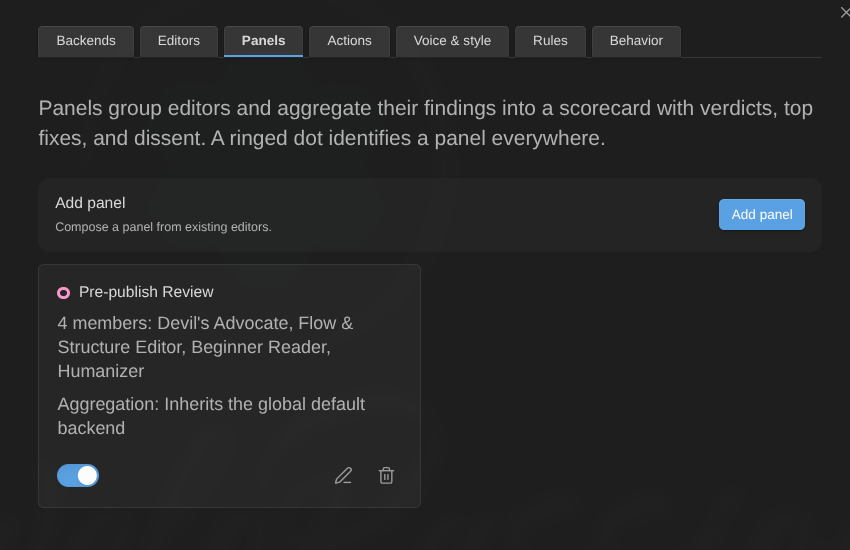
The starter pack ships Pre-publish review: Devil’s Advocate, Flow & Structure Editor, Beginner Reader and Humanizer, behind one question — is this ready to publish under the author’s name, to a smart audience that did not ask to read it?
The charter does two jobs
It is appended to every member’s prompt while they review, and it is the brief the summary is written against. So write it as a standard, not as output instructions: what the panel is for, how it weighs competing judgments, what counts as blocking versus polish, and how much of the author’s voice is an asset rather than a defect.
The seeded charter is worth reading before writing your own. It names the four failures the panel exists to catch, states that one load-bearing objection outweighs several shrugs, asks for concrete actions tied to exact passages, and says explicitly that disagreement is information rather than something to smooth over.
Run one
- Bind a review-class action (critique, find evidence, identify assumptions, or a custom report-findings action) to the panel, then run it from the selection context menu or the palette. The menu says “Critique (panel: Pre-publish review)”, because one press is one request per member.
- Or assign the panel to a scope with a binding rule — every review of a note in that folder, with that tag, or of that note type then convenes the panel.
The members review in parallel exactly like ordinary editors: same highlights, same cards, same retry, same triage.
The scorecard
When the members settle, one more request writes the scorecard, and it appears at the top of the AI Editor Review panel:
- an overall verdict with its reasoning;
- a verdict per member, each with a one-line rationale;
- Top fixes, ranked — select one to jump to the member finding it came from;
- Where the members disagreed, kept as who said what rather than flattened into a balanced middle nobody argued for.
A member’s findings are still in its own section below, exactly as if it had run alone.
The aggregation input is compacted and fitted to the context budget round-robin across members, so no single verbose member crowds the others out. Every omission is counted.
When something fails
- A member fails. The panel completes with the members that did run, names the missing one, and says the summary did not see it. Retry that member from its section or its rail row and the scorecard is rewritten.
- The summary itself fails. Every member’s findings are still there. The block above them says what went wrong and that the reviews below are unaffected.
- Nothing is silently dropped. A panel never quietly reports fewer opinions than it gathered.
Generating more
A finished member gets the same Generate more (n) button an ordinary editor gets. While a member is generating more, the scorecard is marked as belonging to the previous round — “From the previous round — a member is generating more, so this will be rewritten” — rather than being deleted, so you are never left with nothing while the new round runs.
Telling a panel from an editor
Panels are never distinguished by colour or shape alone:
- the name always carries “(panel)” — in dropdowns, menus, commands, the rail, the scorecard and the panel sections;
- on the rail a panel’s row has a hollow centre where an editor’s is filled, with its members bracketed underneath it (the ring around either one is its status, not its kind);
- an editor is the unmarked default; only panels are marked.
Panels from the command line
editor-ai-daemons:review waits for the scorecard before returning and includes it in its output, rather than returning the moment the members settle — otherwise you would pay for a synthesis nothing ever shows you. See The command line.