Configuration reference
Every setting, where it lives, and what it defaults to. Settings are stored in this plugin’s data.json inside your vault — see Privacy and security.
Settings → AI Editor has seven pages: Backends, Editors, Panels, Actions, Voice & style, Rules, Behavior.
Requires Obsidian 1.13.0 or newer. The settings use Obsidian’s declarative settings API, so individual settings are reachable from Obsidian’s own settings search — you can type “idle delay” or “strip frontmatter” without knowing which page holds it. Collections support keyboard delete, and backends, editors, panels and rules can be dragged to reorder. Actions cannot: they are a fixed set of verbs plus your custom ones, and nothing reads their order.
Behavior page
Setup
| Setting | Type | Default | What it does |
|---|---|---|---|
| Setup wizard | button | — | Re-opens the guided setup. Nothing is saved until the last step. |
Runs
| Setting | Type | Default | Range | What it does |
|---|---|---|---|---|
| Size warning threshold (words) | int | 8000 | 100–1000000 | Reviews of notes above this word count ask for confirmation first |
| Max concurrent requests | int | 3 | 1–10 | How many backend requests may run in parallel, plugin-wide |
| Request timeout (seconds) | int | 600 | 30–3600 | How long one API editor request may run. CLI backends carry their own |
| Context budget (characters) | int | 200000 | 1000–2000000 | Total budget per run across system prompt, note and attachments |
Daemon
| Setting | Type | Default | Range | What it does |
|---|---|---|---|---|
| Enable automatically for every note | toggle | off | — | Daemon mode is per note and starts off for each note you open; this makes every note start with it already on. The per-note rail toggle still works either way — see Daemon mode |
| Idle delay (seconds) | int | 3 | 1–600 | Typing, moving the cursor or selecting text restarts the clock; triaging findings (panel or card use) does not; only an actual edit arms a refresh |
History
| Setting | Type | Default | What it does |
|---|---|---|---|
| Durable history | toggle | off | Keep the History tab across sessions, per note. Stores quoted note text in the plugin folder — see Privacy |
| Clear history | button | — | Removes every history entry, in memory and on disk |
Privacy exclusions
| Setting | Type | Default | What it does |
|---|---|---|---|
| Excluded folders | list | empty | Notes under these folders never leave the vault |
| Excluded tags | list | empty | Notes carrying these tags never leave the vault |
| Respect frontmatter opt-out | toggle | on | Notes with ai_editor: false are excluded entirely |
| Strip frontmatter | toggle | off | Remove frontmatter from every note sent to backends |
Up to 200 folders and 200 tags.
Responses
| Setting | Type | Default | What it does |
|---|---|---|---|
| Response language override | text | empty | Answer in this language; empty means each note’s own language |
| Default comment editor | dropdown | None | Editor handling margin comments unless rerouted per comment |
| Margin comment column | toggle | on | Show margin comments beside the text; off keeps them in the panel |
Import & export
| Setting | Type | What it does |
|---|---|---|
| Export settings | button | Write the sections you pick to a vault file or the clipboard |
| Import settings | button | Add entities from an exported file, after confirming a summary |
See Move settings between vaults.
Backends page
| Setting | Type | Default | What it does |
|---|---|---|---|
| Global default backend | dropdown | none | What editors and panels use unless they override it |
| Default model | text | empty | The default backend’s model, editable inline |
| Add backend | dropdown | — | Anthropic, OpenAI, OpenRouter, OpenAI-compatible, Azure OpenAI, Ollama, Claude Code, Codex |
Up to 50 backends.
API backend fields
| Field | Type | Default | Shown for |
|---|---|---|---|
| Label | text | — | all (required) |
| API key | secret | empty | all |
| Base URL | text | empty | all |
| Deployment | text | empty | Azure OpenAI (required) |
| API version | text | empty | Azure OpenAI |
| Default model | text | empty | all |
| Thinking | dropdown | Off | Anthropic, Ollama |
| Thinking budget (tokens) | int | 8192 | Anthropic, legacy mode only (1024–32000) |
| Reasoning effort | dropdown | Default | OpenAI, Azure OpenAI, OpenRouter |
| Extra request body | JSON | empty | OpenAI-compatible, OpenRouter |
API key is an Obsidian secret picker: select or create a secret in Obsidian’s secret storage. Only the secret’s name is saved in data.json; the key stays on this device and must be set once per device. See Privacy and security.
CLI backend fields
| Field | Type | Default | What it does |
|---|---|---|---|
| Tool | fixed | — | Claude Code or Codex |
| Label | text | — | Required |
| Executable | path | empty | Absolute path to the binary; Detect fills it in |
| Default model | text | empty | Empty means the tool’s own default |
| Timeout | int | 300 s | 10–3600. Separate from the API request timeout |
| Allowed to run | consent | not granted | Required before the backend runs at all |
| Tool and research mode | consent | not granted | Claude Code only; Codex states why it has no toggle |
| Test connection | button | — | One real run through the whole path |
See CLI backends.
Editors page
Up to 200 editors. Per editor:
| Field | Type | Default |
|---|---|---|
| Name | text | — |
| Color | swatch + custom picker | var(--color-accent) |
| Persona prompt | textarea | empty |
| Prompt notes | note refs | empty |
| Follow links | toggle | off |
| Backend | dropdown | inherit global |
| Model override | text | empty |
| Include linked notes | toggle | off |
| Linked notes cap | int | 5 (1–20) |
| Inject voice profile | toggle | on |
| Review capability | toggle | on |
| Rewrite capability | toggle | on |
| Research capability | toggle | off |
| Learning memory | dropdown | Off |
| Memory text | textarea | empty |
| Memory note path | text | empty |
| Enabled | toggle | on |
Enabled off hides the editor everywhere (rail, highlights, panel) and keeps it out of daemon refreshes; its findings are hidden, not deleted, and return when it is re-enabled — see Disabling an editor.
Order. The move up / move down buttons on each card set the order editors run in, and the order they appear in the rail and the review panel. Put the ones whose findings matter most first. The order applies to panel runs too: a panel’s membership says who takes part, never in what sequence. A disabled editor keeps its place in the list, so re-enabling it restores the position you chose.
Panels page
Up to 50 panels, 1–20 members each.
| Field | Type | Default |
|---|---|---|
| Name | text | — |
| Color | swatch + custom picker | var(--color-accent) |
| Members | toggles | — |
| Charter | textarea + note refs | empty |
| Aggregation backend | dropdown | inherit global |
| Aggregation model override | text | empty |
| Enabled | toggle | on |
See Work with panels.
Actions page
Up to 200 bindings. Nine built-in verbs plus your own custom actions.
| Field | Applies to | Notes |
|---|---|---|
| Target | all | An editor; a panel only for report-findings actions |
| Name | custom actions | Required before the action appears anywhere |
| Instruction | custom actions | Textarea + note refs + Follow links; required |
| What it does | custom actions | Rewrite the selection / Write more at the cursor / Report findings. No default |
See Run actions on a selection.
Voice & style page
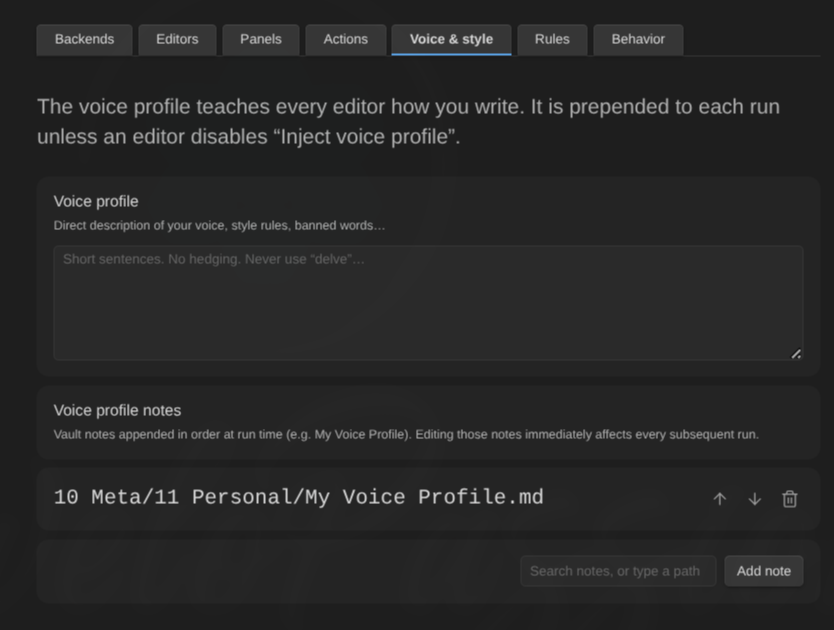
| Field | Type | Default |
|---|---|---|
| Voice profile | textarea | empty |
| Voice profile notes | note refs | empty |
| Follow links | toggle | on |
Rules page
Up to 200 rules, evaluated in list order with kill switches winning from anywhere.
| Field | Type | Values |
|---|---|---|
| Enabled | toggle | on |
| Match | dropdown | Folder / Tag / Frontmatter / OSK note type |
| Value | text | Depends on the match type |
| Effect | dropdown | Assign reviewer / Disable plugin |
| Target | dropdown | Editor or panel, only for Assign reviewer |
See Binding rules.
Commands
None of them ships a default hotkey. Assign your own in Settings → Hotkeys.
| Command | What it does |
|---|---|
| Review current note | Reviews the active note |
| Review selection | Reviews the selected text |
| Ask a question | One editor or one panel, one freeform question |
| Ask for comments | Parks a margin comment on the selection |
| Preview what will be sent | Read-only context preview; sends nothing |
| Open review panel | Opens AI Editor Review in the sidebar |
| Cancel review or action | Cancels whatever is in flight for the note |
| Next finding / Previous finding | Keyboard triage stepping |
| Accept current finding | Applies the replacement, moves to the next |
| Dismiss current finding | Clears it, moves to the next |
| Cycle severity filter | All → warnings and suggestions → warnings only |
| Accept all non-conflicting findings | Bulk accept across every editor of the note |
| Dismiss all findings | Bulk dismiss across every editor of the note |
| Accept all from <Editor> | One per enabled editor, generated dynamically |
| Dismiss all from <Editor> | One per enabled editor, generated dynamically |
| Generate more findings from every finished editor | One extra round per finished editor |
| Toggle the margin comment column | View preference; the comments are unaffected |
| Distill editor learnings | Turns this session’s triage decisions into editor memory (one request) |
| Run setup wizard | Re-opens the guided setup |
| <Action name> | One command per bound action, appearing and disappearing with the binding |
Context menus
Right-click a selection (editor): bound actions, then Review selection, Ask for comments…, Ask a question….
Right-click a note (file explorer): Review note, Open review panel.
Limits
| Thing | Cap |
|---|---|
| Backends | 50 |
| Editors | 200 |
| Panels / members per panel | 50 / 20 |
| Actions / rules | 200 / 200 |
| Findings per backend result | 200 |
| Highlighted findings per note | 2000 (all stay in the list) |
| Margin comments per note | 500 |
| Push-back exchanges per finding | 6 |
| Linked notes per editor | 20 |
| Followed links per prompt note | 20 |
| CLI backend output | 8 MB |