Set up a backend
A backend is where the thinking happens. You can configure as many as you like and point different editors at different ones — a cheap fast model for the Concision Editor, a stronger one for the Devil’s Advocate.
Everything below lives in Settings → AI Editor → Backends.
Two families
- API backends call a hosted (or self-hosted) HTTP endpoint: Anthropic, OpenAI, OpenRouter, any OpenAI-compatible endpoint, Azure OpenAI, Ollama.
- CLI backends run an agent installed on your own machine: Claude Code, Codex. They have their own security model and their own consent flow — read CLI backends before enabling one.
Both families are resolved through the same code path, so anything that can run a review can run either.
Add an API backend
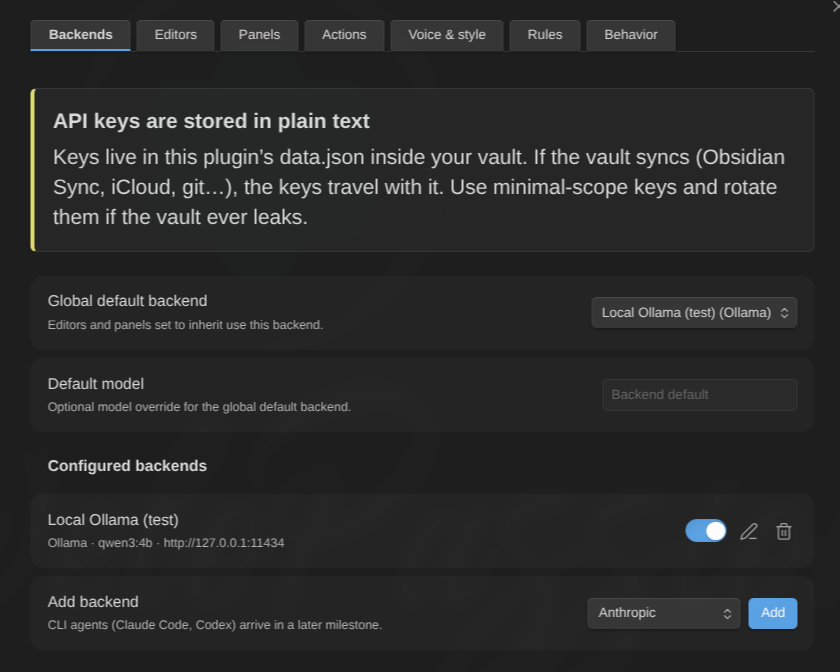
- Settings → AI Editor → Backends → Add backend, pick the provider, select Add.
- Fill in the fields the provider needs (below).
- Select Add backend to save.
- Set it as the Global default backend at the top of the page — editors inherit it unless they override it — or assign it per editor.
Fields, by provider
| Field | Shown for | Needed by |
|---|---|---|
| Label | all | all — it is how you pick the backend elsewhere |
| API key | all | all except Ollama — a secret in Obsidian’s secret storage |
| Base URL | all | OpenAI-compatible, Azure OpenAI; optional override elsewhere |
| Deployment | Azure OpenAI | Azure OpenAI |
| API version | Azure OpenAI | Azure OpenAI |
| Default model | all | all, unless every editor overrides it |
| Thinking | Anthropic, Ollama | — |
| Thinking budget (tokens) | Anthropic, legacy mode only | — |
| Reasoning effort | OpenAI, Azure OpenAI, OpenRouter | — |
| Extra request body | OpenAI-compatible, OpenRouter | — |
Default base URLs when you leave the field empty: https://api.anthropic.com (Anthropic), https://api.openai.com/v1 (OpenAI), https://openrouter.ai/api/v1 (OpenRouter), http://127.0.0.1:11434 (Ollama). OpenAI-compatible and Azure OpenAI have no default — that is the whole point of those kinds.
Saving refuses the problems it can be certain about, in the provider’s own terms: “OpenAI-compatible backends need a base URL”, “OpenRouter backends need an API key”, “Azure OpenAI backends need a deployment name”. The rest is caught when a request is actually built, which is what Test connection is for — an Azure backend saved without its base URL, API version or key saves happily and fails the test.
Provider notes
- Anthropic — direct browser calls, no proxy needed.
- OpenAI — standard Chat Completions.
- OpenRouter — a dedicated entry rather than “just an OpenAI-compatible endpoint”: the base URL is preset, attribution headers are sent, and reasoning is passed through in OpenRouter’s own parameter. Paste a key and go.
- OpenAI-compatible — anything speaking Chat Completions: LM Studio, Groq, vLLM, llama.cpp servers, a corporate gateway. Give it the base URL and, if it wants one, a key.
- Azure OpenAI — addresses a deployment, not a model. It needs all four of base URL, Deployment, API version and key; only the deployment is enforced when you save, so run Test connection before relying on it.
- Ollama — local, no key. If it refuses browser requests, see Troubleshooting.
Models
A model is resolved in this order: the editor’s model override → the backend’s default model → for CLI backends, the tool’s own default. If nothing supplies one for an API backend, the editor is skipped with “no model configured” rather than failing halfway through a run.
There is no model list to pick from: model ids change weekly and a stale dropdown is worse than a text field. Paste the id your provider documents.
Thinking and reasoning modes
Both default to off everywhere, deliberately: a model that reasons silently for minutes with no visible output is indistinguishable from a hang.
Thinking (Anthropic, Ollama):
- Off — no extended thinking.
- On — Anthropic: adaptive thinking, the current API mode (Claude 4.6 and newer). Ollama:
think: true. - Budget (legacy) — Anthropic only: the manual thinking block with an explicit token budget. Only models up to Claude 4.5 accept it; current models reject it with HTTP 400. Use it only if you are pinned to an older model.
Thinking budget (tokens) appears only in legacy mode. Minimum 1024, maximum 32000, default 8192.
Reasoning effort (OpenAI, Azure OpenAI, OpenRouter): default (send nothing) / minimal / low / medium / high.
Turning either on makes runs slower. If you enable thinking on a local model, raise Request timeout at the same time — see Troubleshooting.
Extra request body (advanced)
For OpenAI-compatible and OpenRouter backends only. A raw JSON object merged into the request body — provider routing preferences, host-specific flags, whatever your endpoint documents. It is validated as a JSON object when you save ({"think": true}, not […] and not a bare value) and re-validated before the request is built.
Anything you put here is sent with every request from that backend. It can hold a credential, which is why exporting settings declares a non-empty extra body instead of pretending the export is safe to share.
Test connection
Every backend dialog has a Test connection button. It runs one small real operation through the exact executor a review uses — same adapter, same timeout logic, same result validation — so a pass means reviews will work, not merely that the endpoint answers.
| Outcome | What it means |
|---|---|
| Connection works | Nothing left to do. |
| Reached, but not usable | The endpoint answered but the model ignored the required structure. A model problem, not a connection one. Try a stronger model. |
| Failed | Credentials, network, timeout or configuration. The message says which. |
The check uses its own 60-second timeout rather than your configured request timeout. A local model still loading its weights can fail here and work fine for a real review; the message says so when that is what happened.
For a CLI backend, Test connection asks for launch consent first — running the test is launching the program.
Streaming
Structured, buffered output is the baseline. Anthropic and the OpenAI-family kinds (OpenAI, OpenRouter, OpenAI-compatible) are executed as SSE streams where the transport allows it, which is what keeps the rail’s progress alive during a long answer. Azure OpenAI and Ollama run buffered.
Either way, an editor’s findings appear when that editor finishes, not one at a time — incremental finding extraction is deliberately out of scope. What you see arriving progressively during a multi-editor review is the editors finishing at different times.
Timeouts, concurrency, budget
These are global and live in Settings → AI Editor → Behavior, not on the backend:
- Request timeout (seconds) — how long one editor’s API request may take, connection to last byte. Default 600 (10 minutes), range 30–3600. Slow local models legitimately need minutes.
- Max concurrent requests — how many backend requests run in parallel across the whole plugin. Default 3, range 1–10.
- Context budget (characters) — total budget per run. Default 200000, range 1000–2000000.
A CLI backend ignores the request timeout and carries its own timeout instead (default 300 seconds), because an agent that goes exploring works on a different scale.
Deleting a backend
Deleting shows you what points at it before it happens — editors, panels, the global default — and resets those references to “inherit” rather than leaving them dangling.