AI Editor
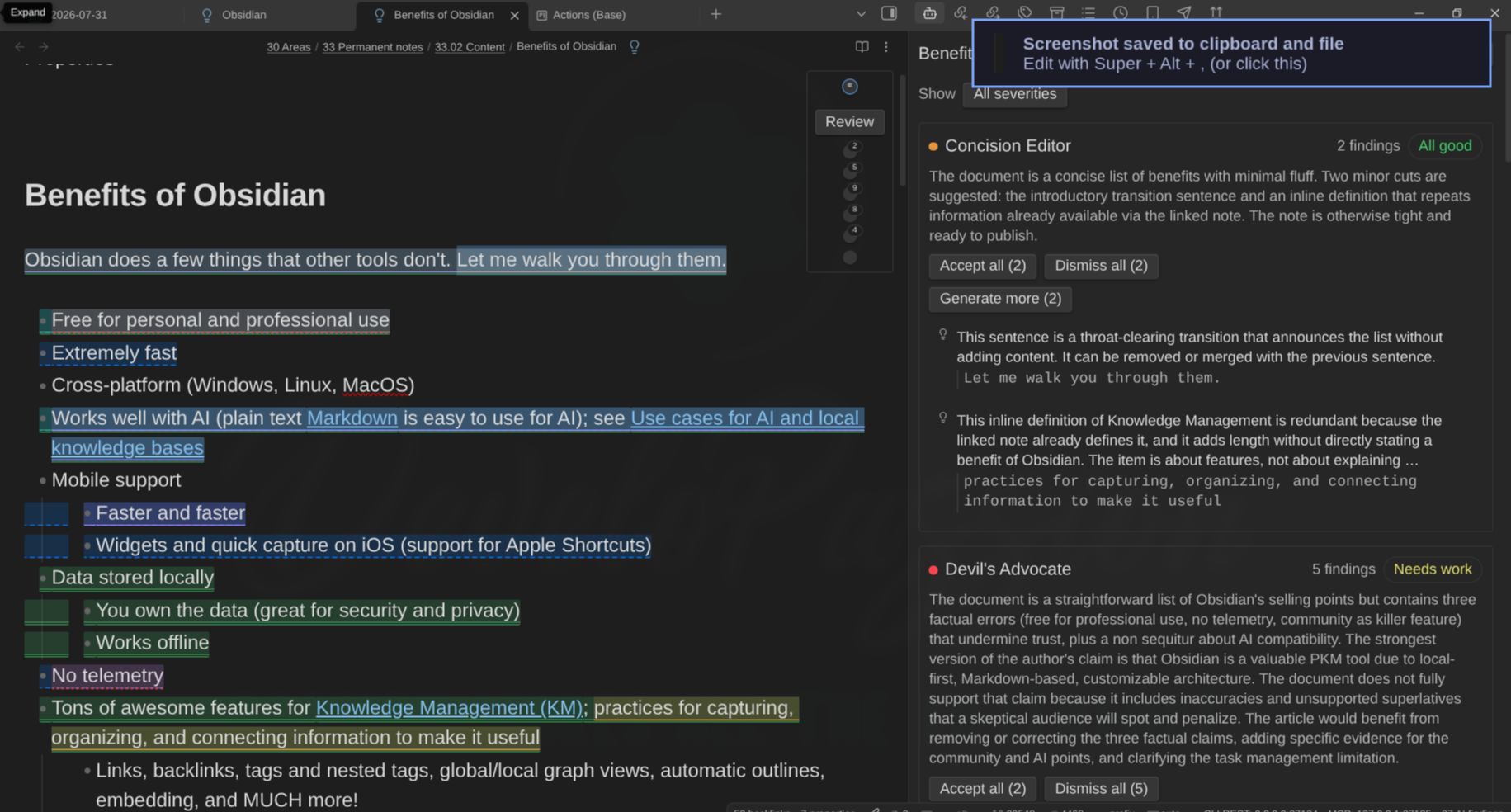
AI editing, reviewing and QA inside the Obsidian editor — not a chat sidebar. Configurable AI personas (“Editors”) and groups of them (“Panels”) highlight what they care about in your text, argue with you, and propose surgical edits you accept or reject inline.
Writing alone has a blind spot: you. This plugin gives you a bench of reviewers that read your note the way your audience would, before your audience does.
Nothing runs on its own, and nothing is written without a diff. Desktop only. Bring your own backend.
Key features
- Editors — AI personas you define with a prompt. Seven ship with the plugin, all editable.
- Panels — groups of editors that review together and produce one scorecard: overall verdict, per-member verdicts, ranked top fixes, and where they disagreed.
- Review loop — findings anchored to the exact words they quote, triaged from the keyboard, with push-back replies when you disagree.
- Ask a question — a freeform question to one editor or a whole panel, answered as findings on your note rather than chat.
- Actions — rephrase, summarize, simplify, humanize, continue writing, say more, critique, find evidence, identify assumptions — plus placement verbs that need no selection (expand the current section, continue at the end of the note) and your own custom verbs.
- Margin comments — park a question on a passage and keep writing; the answer arrives in a column beside the text and survives restarts.
- Daemon mode — opt-in automatic refreshes after you pause editing, off by default, honest about the cost.
- History — the session’s findings, replies, scorecards and transform decisions in their own panel tab; durable across restarts if you opt in.
- Vault as configuration — personas, charters and voice profile can live in your own notes, read fresh at every run.
- Bring your own backend — Anthropic, OpenAI, OpenRouter, OpenAI-compatible endpoints, Azure OpenAI, Ollama, or the Claude Code and Codex CLIs running locally.
Quick start
- Install the plugin and enable it (see Install and quick start).
- The setup wizard opens on first load: add a backend, select Test connection, choose your editors, point at a voice profile, decide when editors run. Nothing is saved until the last step.
- Open a note and run Review current note.
- Click a highlight to read a finding; Accept or Dismiss it — or push back in the reply box and see whether the editor holds its position.
The guide
| Page | What it covers |
|---|---|
| Install and quick start | Requirements, install routes, the setup wizard, what gets seeded |
| Set up a backend | Providers, models, thinking modes, timeouts, test connection |
| Review a note | The rail, findings, cards, keyboard triage, bulk operations |
| Create and tune editors | Personas, prompts, context, capabilities, the voice profile |
| Run actions on a selection | Built-in verbs, inline diffs, custom actions |
| Work with panels | Charters, scorecards, partial failures |
| Margin comments | Parked questions answered in the background |
| Binding rules | Per-folder, per-tag, per-note-type routing and kill switches |
| Daemon mode | Automatic refreshes, and what they cost |
| CLI backends | Claude Code and Codex, and their security model |
| The command line | editor-ai-daemons:review, editor-ai-daemons:status, editor-ai-daemons:cancel |
| Move settings between vaults | Export, import, what never travels |
| Privacy and security | What is sent, what is excluded, where keys live |
| Configuration reference | Every setting, its default, every command |
| Tips and best practices | Getting good results without burning tokens |
| Troubleshooting | Timeouts, CORS, unusable answers, unanchored findings |
About
Created by Sébastien Dubois. Source on GitHub.
My other Obsidian plugins
| Plugin | What it does |
|---|---|
| Agentic Resource Discovery Server | Local-first Agentic Resource Discovery publisher and registry that serves your AI skills and tools to agents over a local HTTP and MCP server |
| Book Exporter | Export books (one manifest note + linked chapter notes) to EPUB and PDF via Pandoc |
| Bookshelf Base | Display your notes as a visual bookshelf via a custom Bases view |
| Dataview Serializer | Serialize Dataview queries to Markdown, and keep the Markdown representation up to date |
| Expander | Replace variables across your vault using HTML comment markers. Supports static values and dynamic functions |
| Ghost Publish | Publish your vault notes to a Ghost blog with configurable presets for tags, newsletters, and frontmatter conventions |
| Graph Explorer Base View | A custom Bases view that renders notes as an interactive force-directed graph with explored/unexplored tracking |
| Hidden Folders Access | Index hidden root-level folders (e.g. .claude) so they appear in the file tree, metadata cache, and Bases |
| Journal Bases | Custom Base views for journaling and periodic reviews |
| Kanban Action Planner | Render your notes as configurable Kanban boards and calendars inside Bases, with statuses, ordering, relationships, and scheduling |
| Life Tracker | Capture and visualize the data that matters in your life |
| Note Village | A 2D pixel art village where your notes become villagers you can explore and chat with using AI |
| Obsidian Starter Kit | Adds strong typing support and powerful automation support for notes |
| Remarkable Synchronizer | Connect to the reMarkable cloud, list, download, and sync notebook pages as images |
| Replicate | Use AI models with ease via the Replicate.com integration |
| REST and MCP server | Exposes CLI commands as RESTful API endpoints and an MCP server for AI tool integration |
| Time Machine | Browse, compare, and restore previous versions of your notes using built-in file-recovery snapshots |
| Transcriber | Transcribe images to markdown using Ollama vision models |
| Typefully | Publish social media posts with ease using the Typefully integration |
| Update Time | Automatically update front matter to include creation and last update times |
Everything I build is documented in my newsletter and on my YouTube channel.
News & support
To stay up to date about this plugin, Obsidian in general, personal knowledge management and note-taking:
- Subscribe to my newsletter
- Subscribe to my YouTube channel
- Join the Knowii community and learn to organize your notes and put your knowledge to work, together with fellow knowledge workers
If this plugin is useful to you, here are the best ways to support my work ❤️: